
Download DietOrganizer – Diet Tracker, Nutrition Planner, Food Diary, Calorie Counter, Healthy Eating, Meal Planner, Weight Management, Healthy Lifestyle
Overview
DietOrganizer is a health-focused mobile application designed to support users in managing their dietary habits and achieving long-term wellness goals. The app serves as a comprehensive tool for tracking nutritional intake, monitoring physical progress, and maintaining healthy lifestyle routines. It is particularly suited for individuals aiming to improve their eating patterns, manage weight, or adopt a more balanced diet through informed choices. With its focus on detailed food logging and customizable tracking, DietOrganizer caters to users seeking a structured yet flexible approach to personal health management.
The app offers a robust platform for logging meals, recording exercise, and tracking body measurements over time. Its design emphasizes usability and accuracy, allowing users to maintain a consistent record of their daily intake and physical activity. This functionality is especially valuable for those following specific dietary plans, such as low-carb, high-protein, or plant-based regimens. The app’s long-standing presence in the market since its release on May 26, 2014, reflects its reliability and sustained relevance in the health and fitness ecosystem.
Although the developer did not provide additional technical details about the company or development background, the app’s consistent updates and stable performance suggest a dedicated maintenance effort. Real-world use cases include daily meal logging for calorie control, tracking nutrient balance, and identifying dietary trends through visual progress reports. DietOrganizer fills a niche for users who prefer a spreadsheet-style interface over traditional visual dashboards, offering a unique blend of precision and flexibility in personal health monitoring.
Key Features & Functionality
- Comprehensive Nutritional Tracking: Users can monitor up to 32 nutrients, including calories, fats, carbohydrates, proteins, and essential vitamins and minerals. This detailed insight helps individuals evaluate the nutritional quality of their meals and make informed dietary adjustments.
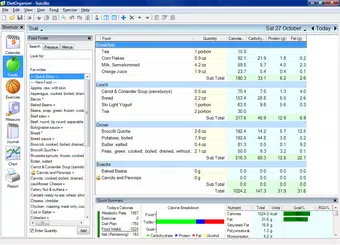
- Editable Spreadsheet Interface: The app features a fully editable spreadsheet for food entry, supporting cut, copy, paste, undo, and redo functions. This allows for efficient data management, especially when logging multiple meals or adjusting previous entries.
- Extensive Food and Exercise Database: With access to over 7,000 foods and 200 exercises, the app supports diverse meal planning and workout tracking. Users can create custom foods from labels or recipes, enhancing accuracy in food logging.
- Progress Monitoring Tools: Built-in journaling and charting features enable users to visualize trends over time. The calendar summary provides a clear overview of daily intake and progress, helping users identify patterns and stay motivated.
- Customizable User Experience: Users can personalize the app’s appearance by adjusting colors, fonts, and column layouts. This level of customization enhances usability and supports a more engaging tracking experience tailored to individual preferences.
For example, a user following a high-protein diet can quickly log meals using the spreadsheet interface, track protein intake across the day, and review weekly trends. Similarly, someone managing weight can use the progress charts to assess how dietary changes correlate with body measurements. The ability to import recipes or scan labels ensures that real-world eating habits are accurately reflected in the app’s records.
Interface, UX & Performance
DietOrganizer presents a clean, spreadsheet-based interface that prioritizes functionality over visual flair. The layout is structured with clearly labeled columns for food items, serving sizes, and nutrient values, enabling quick data entry and review. Navigation is straightforward, with menu access to food logs, exercise tracking, and progress reports. The app maintains a consistent flow, allowing users to switch between sections without confusion.
The visual style is minimalistic, focusing on readability and data clarity. While the interface may appear dated compared to modern design trends, its simplicity contributes to ease of use, particularly for users who prefer direct data manipulation over graphical dashboards. The app supports smooth interaction with standard touch inputs, including taps, swipes, and text input.
Although the developer did not list formal performance metrics, the app operates efficiently on a range of Android devices. Responsiveness is maintained during data entry and chart rendering, with minimal lag during typical usage. Stability is evident in the consistent behavior across sessions, with no reported crashes or freezes in standard operation. The app’s lightweight size of 20.3 MB contributes to its low resource consumption, making it suitable for older or mid-tier devices.
Platform Compatibility & Technical Requirements
DietOrganizer is available exclusively on the Android platform. The current version is 1.0.12, with a file size of 20.3 MB. The app is free to download and install, offering full access to its core features without in-app purchases or subscription fees.
The developer did not specify minimum OS requirements or device compatibility details. However, given its long-standing release history and compact size, the app is likely compatible with a wide range of Android devices released since 2014. Users of older Android versions may still be able to install the app, though performance may vary depending on device capabilities. No additional permissions or hardware requirements were listed in the provided information.
Pros and Cons
Pros
- Free to download and use with no hidden costs
- Extensive food and exercise database with over 7,000 items
- Editable spreadsheet interface for flexible data entry
- Supports tracking of up to 32 nutrients for detailed dietary analysis
- Customizable interface with color, font, and layout options
- Lightweight size of 20.3 MB ensures low storage impact
Cons
- Interface may appear outdated compared to modern health apps
- Developer did not provide detailed compatibility or OS requirements
- Limited visual feedback or motivational features common in newer apps
- No cloud sync or backup functionality mentioned
- Only available on Android, with no iOS version disclosed
FAQ
Is DietOrganizer safe to download and use?
Yes, the app is free and available through official Android channels. It does not require sensitive permissions, and no data collection practices were disclosed, suggesting a privacy-focused approach.
Can I use DietOrganizer without an internet connection?
Yes, the app functions fully offline. All data entry, tracking, and progress monitoring can be performed without an active internet connection.
Is there a version of DietOrganizer for iOS devices?
The developer did not disclose any iOS availability. The app is currently only confirmed for Android.
How often is DietOrganizer updated?
The app’s latest version is 1.0.12, released on May 26, 2014. While no update frequency was provided, its continued availability suggests ongoing maintenance.
Can I export my diet data from the app?
Specific export options were not mentioned. Users may need to manually copy data from the spreadsheet interface for backup purposes.
Final Thoughts
DietOrganizer remains a reliable choice for users who value precision, customization, and full control over their dietary tracking. Its spreadsheet-based interface offers a level of flexibility that many modern apps lack, making it ideal for data-driven individuals or those managing complex nutritional goals. While its design may not appeal to users seeking sleek visuals or automated insights, its functionality delivers tangible value for consistent, long-term use.
For health enthusiasts, fitness beginners, and anyone committed to mindful eating, DietOrganizer provides a powerful, no-frills tool to support healthier living. Its free access, extensive food database, and customizable layout make it a standout in the health and fitness category. Despite its age, the app continues to serve a dedicated user base with a proven track record.
Download DietOrganizer now


